bad. fucking. mood.
bad. fucking. mood.
Please keep in mind that this post is more than 6 years old. Who the hell knows what I was thinking back then?! Damn kids... get off my lawn!
bad. fucking. mood.
Please keep in mind that this post is more than 6 years old. Who the hell knows what I was thinking back then?! Damn kids... get off my lawn!
Several people have asked me how I block various people from seeing some parts of my facebook feed, so…
1 – Go to your full contacts list. “Friends” -> “All Friends”
2 – Create a new list and name it whatever you want
3 – Add the people you wish to hide things from to this list
4 – Now go to “settings” -> “privacy settings” -> “profile”
5 – Take any section you wish to filter from this list, and choose “customize” from the pull-down menu
6 – at the bottom of the resultant window, under the “except these people”, type in the name of the ‘bad people’ list you created earlier.
That’s it. I just mostly filter out potentially offensive stuff from my work contacts.
Please keep in mind that this post is more than 6 years old. Who the hell knows what I was thinking back then?! Damn kids... get off my lawn!
I get a lot of benefit out of continually learning how to use my tools better. Today’s example:
I recently watched some tutorials by photographers using Lightroom. Picked up a few things I didn’t know. And because of it, discovered a few other variations that were even better. I knew this stuff in Photoshop, from back in college. But — as is the point — Lightroom has a much better interface for doing it.
Here’s the original RAW photo, from the recent shoot with Lea. Blown out, yadda yadda yadda. Won’t bother going into why it is this way… but it just is. A lot of missing details, though you could tell it was a beautiful look.
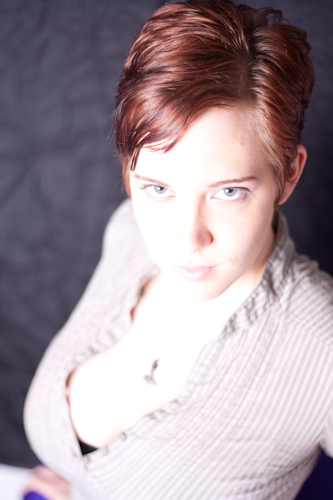
Thankfully, by shooting in RAW format, you preserve a lot of information that would have been lost in a JPEG. I lowered the exposure, and recovered a lot of detail. Still a bit light, but much better. Really pushed it, though. To the point where the boundary on the face between the light and dark has gone slightly yellow. But still a stunning woman.
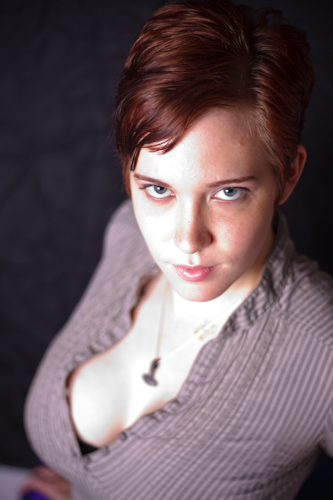
After watching the Lightroom videos, I have been moving away from strictly relying on the exposure/black/fill sliders for color correction, and relying more heavily on various features of the Curves. It gives me much greater control over individual light levels in the photo. Transitions are much smoother. More details are preserved. And as I said, the interface to do all this is very intuitive.
I think this last photo is the best so far.
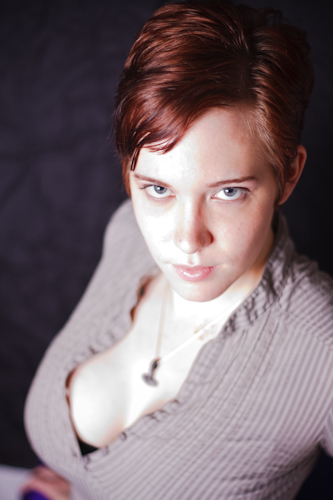
This — of course — is also why I tend to be so reluctant to pursue photography professionally. While I often think “These are some great photos”, somewhere down the line, I almost always look back and think “gawd… I am SO much better than I was when I did THAT!”.
EDIT:
Okay… this is what happens when you don’t proof on multiple monitors. New version, without the gray. (Thanks, Jenny)

Please keep in mind that this post is more than 6 years old. Who the hell knows what I was thinking back then?! Damn kids... get off my lawn!


Please keep in mind that this post is more than 6 years old. Who the hell knows what I was thinking back then?! Damn kids... get off my lawn!
Strange.
I tried copying some photos off a CF card I haven’t used in a while. This card has never been used with the newer card reader. No matter what I did, it wouldn’t show up. Then I noticed a “hot” smell, and when I went to pull the card out of the reader, it burned my fingers. It had been in there off any on for less than a minute total.
Works fine in the old card reader. No heat.
Please keep in mind that this post is more than 6 years old. Who the hell knows what I was thinking back then?! Damn kids... get off my lawn!
 Picked up a new toy, this week. Well, I picked up several, but this one is my favorite so far — a new camera strap.
The old strap — from Epic Software — itself was holding up fine. But the connectors for attaching it to the camera were failing one-by-one. The smallest leather straps actually snapped less than a week after I got the strap. But not big loss. I just merged a couple of the metal bits. But in the last month or so, the larger leather straps have been failing as well. One is already gone. And while I CAN again just merge a couple metals connectors, I lose the capability for the strap to swivel, so it inevitably becomes twisted. And the last leather connector gets worse every day. Every time I grab the camera out of the bag, I cringe and wait for it to snap.
And even if I was willing to live with that, because I’m now down to metal bits connecting the strap to the camera, it has been scratching the hell out of my camera body. While I’ve never been one to baby my equipment, I don’t feel the need to purposely deface it either.
Older cameras just had small swivel points with just a single small hole in them for mounting a strap. So ring connectors made sense. But newer cameras almost universally have slots for attaching straps. These nylon strap connections are less damaging, more flexible, and usually last longer.
But since I had neither the thin straps nor the sewing machine to attach them, I just went looking for a new strap. Can’t stand the straps you find at most camera stores or online shops. They’re all either flat black straps, or the come with the manufacture’s name emblazoned on them in bright, bold 150pt type. But almost no one makes more interesting straps. Epic’s straps were great looking… very retro. But I wasn’t interested in going through the same problems again. A little searching, though, and I finally found My Funky Camera. A woman who apparently buys the parts and makes her own straps — neck or wrist. Thy sounded pretty good, and I found some good reviews online. Her website is a bit lacking in details, but I figured it was worth the minor risk. My order arrived yesterday. Initial impression: I was impressed. It was actually made of much sturdier material than I expected. And it did indeed have the nylon attaching straps. I’m dubious about how long the extra neck padding will last, but it looks good right now, and could be easily removed later. It fit easily only to the camera. It looks great. I have a shoot tomorrow, and a major trip coming up in a couple weeks, so I will be putting it though it’s paces.
Please keep in mind that this post is more than 6 years old. Who the hell knows what I was thinking back then?! Damn kids... get off my lawn!